子找父的值几种方法:
一、递归查找(最通用)
// 递归查找所有父级
function findAllParents(options, targetKey, parents = []) {
  for (const item of options) {
    // 如果当前项就是目标
    if (item.key === targetKey) {
      return {
        current: item,
        parents: parents
      }
    }

    // 如果有子级,继续查找
    if (item.children && item.children.length > 0) {
      const result = findAllParents(item.children, targetKey, [...parents, {
        key: item.key,
        label: item.label
      }])
      if (result) return result
    }
  }
  return null
}

// 使用示例
const targetKey = 'user-list'
const result = findAllParents(menuOptions, targetKey)

if (result) {
  console.log('当前项:', result.current)
  console.log('所有父级:', result.parents)
  console.log('父级keys:', result.parents.map(p => p.key))
  console.log('父级labels:', result.parents.map(p => p.label))

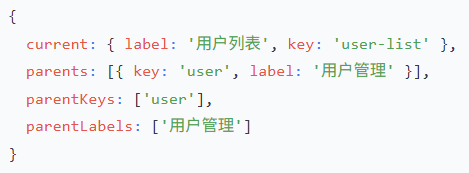
  // 输出:
  // 当前项: { label: '用户列表', key: 'user-list' }
  // 所有父级: [{ key: 'user', label: '用户管理' }]
  // 父级keys: ['user']
  // 父级labels: ['用户管理']
}
二、构建映射表(性能最优,推荐)
// 构建完整的映射关系
const menuMap = new Map() // key -> 完整信息
const parentMap = new Map() // key -> 父级信息列表

function buildMaps(options, parentChain = []) {
  for (const item of options) {
    // 存储当前项信息
    menuMap.set(item.key, {
      ...item,
      parentChain: parentChain  // 保存完整的父级链
    })

    // 存储当前项的父级链
    parentMap.set(item.key, parentChain)

    // 递归处理子级
    if (item.children && item.children.length > 0) {
      buildMaps(item.children, [...parentChain, {
        key: item.key,
        label: item.label
      }])
    }
  }
}

// 初始化映射表
buildMaps(menuOptions)

// 查找函数
function getParentsByKey(key) {
  const parents = parentMap.get(key) || []
  return {
    current: menuMap.get(key),
    parents: parents,
    parentKeys: parents.map(p => p.key),
    parentLabels: parents.map(p => p.label)
  }
}

// 使用示例
const result = getParentsByKey('user-list')
console.log('当前项:', result.current)
console.log('所有父级:', result.parents)
console.log('父级keys:', result.parentKeys)
console.log('父级labels:', result.parentLabels)
三、返回所有层级(含当前项)
function getFullPath(options, targetKey) {
  const findPath = (items, target, path = []) => {
    for (const item of items) {
      const currentPath = [...path, { key: item.key, label: item.label }]

      if (item.key === targetKey) {
        return currentPath
      }

      if (item.children) {
        const result = findPath(item.children, target, currentPath)
        if (result) return result
      }
    }
    return null
  }

  return findPath(options, targetKey)
}

// 使用示例
const fullPath = getFullPath(menuOptions, 'user-list')
console.log('完整路径:', fullPath)
// 输出: [
//   { key: 'user', label: '用户管理' },
//   { key: 'user-list', label: '用户列表' }
// ]

// 分离父级和当前项
const parents = fullPath.slice(0, -1)  // 除最后一个外的所有
const current = fullPath[fullPath.length - 1]  // 最后一个

console.log('父级:', parents)
console.log('当前:', current)
四、支持多级嵌套的完整示例
// 支持任意层级嵌套
const menuOptions = [
  {
    label: '系统管理',
    key: 'system',
    children: [
      {
        label: '用户管理',
        key: 'user',
        children: [
          { label: '用户列表', key: 'user-list' },
          { label: '权限配置', key: 'user-permission' }
        ]
      },
      {
        label: '系统设置',
        key: 'setting',
        children: [
          { label: '基本设置', key: 'setting-basic' }
        ]
      }
    ]
  }
]

// 通用查找函数
function getMenuPath(options, targetKey) {
  const result = []

  const dfs = (items, path) => {
    for (const item of items) {
      const newPath = [...path, { key: item.key, label: item.label }]

      if (item.key === targetKey) {
        result.push(...newPath)
        return true
      }

      if (item.children && dfs(item.children, newPath)) {
        return true
      }
    }
    return false
  }

  dfs(options, [])
  return result
}

// 使用
const path = getMenuPath(menuOptions, 'user-list')
console.log('完整路径:', path)
// 输出: [
//   { key: 'system', label: '系统管理' },
//   { key: 'user', label: '用户管理' },
//   { key: 'user-list', label: '用户列表' }
// ]

const parents = path.slice(0, -1)  // 所有父级
const current = path[path.length - 1]  // 当前项

console.log('所有父级:', parents)
console.log('父级keys:', parents.map(p => p.key))
console.log('父级labels:', parents.map(p => p.label))
// utils/menuHelper.js

/**
 * 根据子菜单key查找所有父级信息
 * @param {Array} menuOptions 菜单配置
 * @param {string} targetKey 目标key
 * @returns {Object} 包含当前项和所有父级的信息
 */
export function getMenuParents(menuOptions, targetKey) {
  const findParents = (items, target, ancestors = []) => {
    for (const item of items) {
      if (item.key === target) {
        return {
          current: item,
          parents: ancestors,
          parentKeys: ancestors.map(a => a.key),
          parentLabels: ancestors.map(a => a.label)
        }
      }

      if (item.children) {
        const result = findParents(item.children, target, [...ancestors, {
          key: item.key,
          label: item.label
        }])
        if (result) return result
      }
    }
    return null
  }

  return findParents(menuOptions, targetKey)
}

// 使用
const result = getMenuParents(menuOptions, 'user-list')
if (result) {
  console.log('当前项label:', result.current.label)
  console.log('父级labels:', result.parentLabels.join(' > '))
  // 输出: 父级labels: 用户管理
}
上一篇:iziModal模态框使用说明
下一篇:没有了
讨论数量:0